fbq('track', 'ViewContent'); fbq('track', 'Search');

Scam Messages

Recent scams affecting the Central and Southern Utah area.

Scammers are Spoofing SBSU’s Phone Number

We are seeing an increase in fraud attempts where scammers are calling and texting claiming to be SBSU Employees.

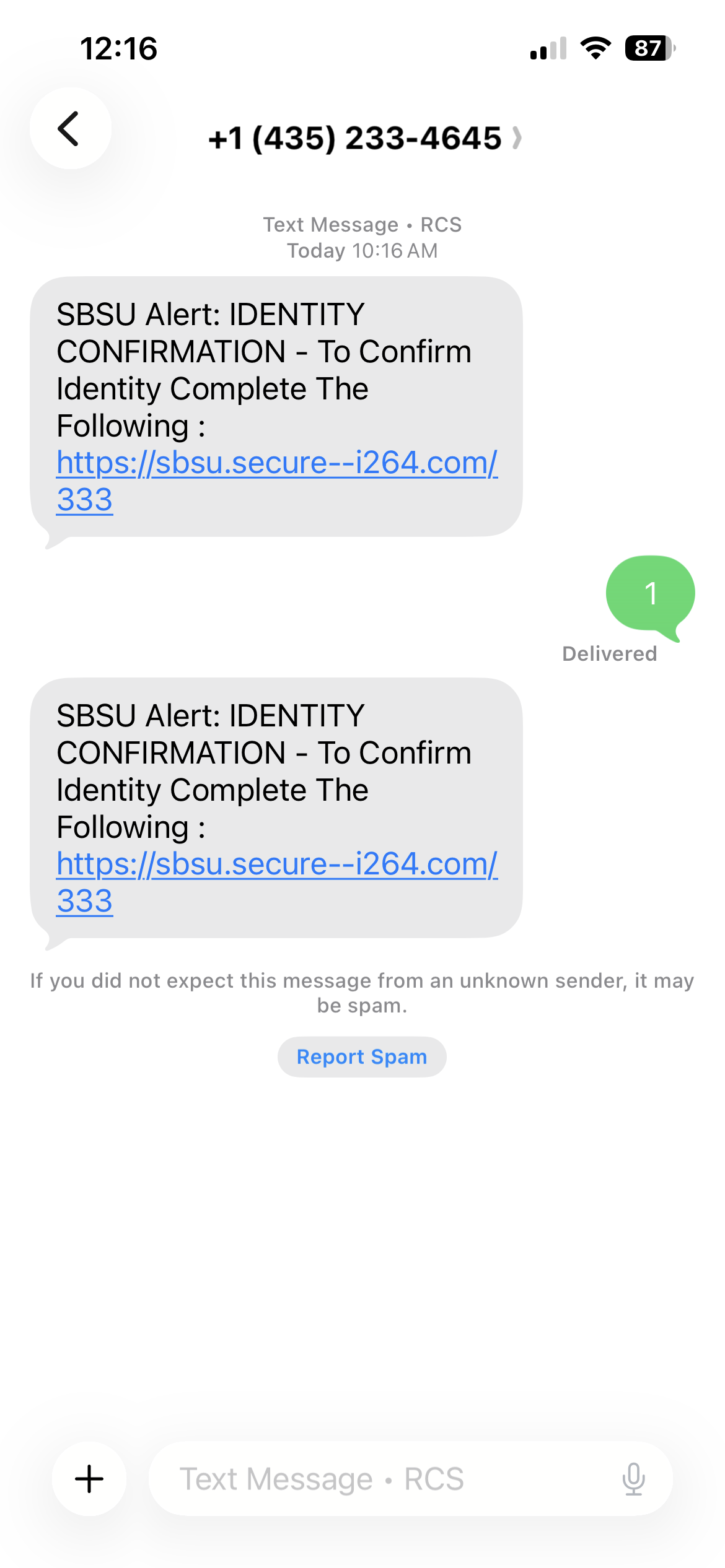
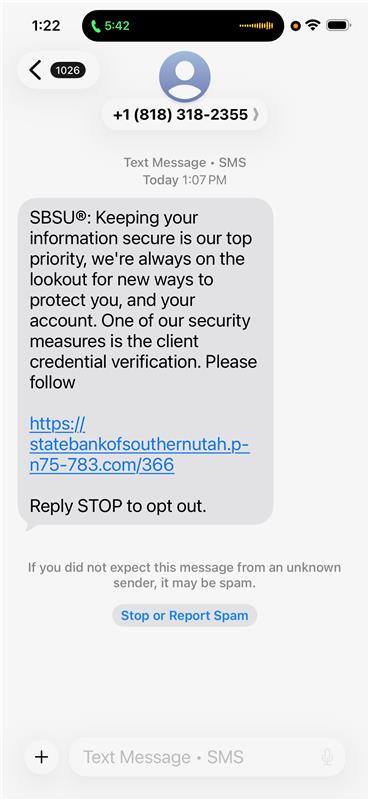
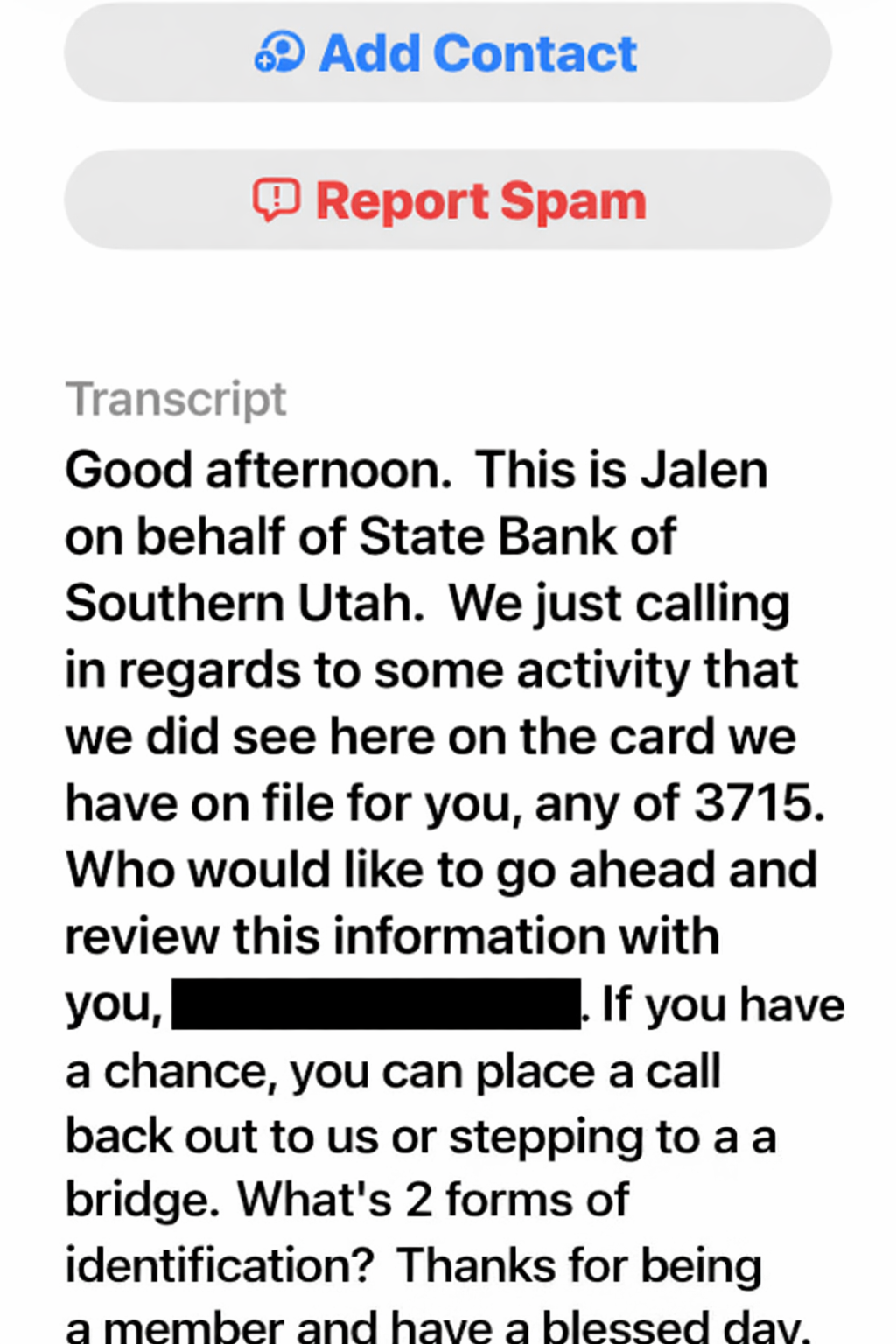
Images of the fraudulent voicemails and texts you might receive:

How the Scam Works

  1. You receive a phone call that appears to come from SBSU.
  2. Immediately after the call or during the call, you receive a text message with a link, asking you to “verify” your identity, account or card information
  3. The link leads to a fraudulent site designed to steal your personal and financial information (online banking credentials, SSN, etc.)

Important Reminder

Legitimate SBSU employees will NEVER:

  • Send you links through email or text
  • Ask for your full debit/credit card number, expiration date, or CVV
  • Ask for your Online Banking username or password

If a message from SBSU says “Do not share this code,” do not share it with anyone—including anyone claiming to be from SBSU., If the message says, “Provide this code to the bank representative assisting you,” then repeat the code, but ONLY if you called the bank.

Protect Yourself from Fraud

  • Download the SBSU Card Suite app from the iOS App Store or Google Play.
  • Register your SBSU debit and credit cards.
  • Receive real‑time alerts when your card is used.
  • Instantly turn your cards on or off from your smartphone.

Cash Management Fraud

Warning: Criminals are utilizing AI and publicly available information to spear phish banking customers throughout the USA.

If you receive a text message, phone call, or Email that appear to be from SBSU, take these actions:

  1. DO NOT click on any link embedded in the message.
  2. Do NOT reveal codes (especially those with a warning to NOT share the code).
  3. Hang up if called.  In all cases, call us at (435)865-2394 to talk to a legitimate bank representative about the message.

If you click on the link or reveal information to the caller, three  things may happen: (1) malware that records keystrokes will be installed on your computer, (2), you will be taken to a fake website that looks like SBSU’s but is designed to steal your user ID and Password when you attempt to login, or (3) you will be talked into revealing information to a random caller who is likely an imposter.

After you call us at (435)865-2394, we will describe security procedures in detail.

Scammers are Pretending to be SBSU Employees

🚨 Fraud Alert: Scammers Are Pretending to be SBSU Employees

We are seeing an increase in fraud attempts where scammers are calling and texting claiming to be SBSU Employees.

How the Scam Works

  • You receive a phone call that may appear to come from SBSU.
  • Shortly after the call—or sometimes during the call—you receive a text message containing a link asking you to “verify your identity.”
  • The link directs you to a fraudulent website designed to steal your personal and financial information if you attempt to logon such as:
    • Online Banking username and password
    • Debit or credit card details
    • Social Security number or other sensitive information
  • We remind of the following:
    • NEVER click links on text messages that appear to be from SBSU. SBSU does not include links inside of text messages.
    • Download the SBSU Card Suite App from the iOS or Android Stores. Register your SBSU debit and/or credit cards to get real-time information each time your cards are used.
    • If called, get the representative’s name and then hang up. Call us back at (435)865-2300 to make sure you are talking to a legitimate bank representative.

📷 Example of fraudulent text messages you may receive:

image


Legitimate SBSU employees will NEVER:

  • Send you links through email or text messages
  • Ask for your full debit or credit card number, expiration date, or CVV
  • Ask for your Online Banking username or password

If a message from SBSU states “Do not share this code,” do not share it with anyone — including someone claiming to be from the bank.
If the message says “Provide this code to the bank representative assisting you,” only repeat the code if you placed the call to SBSU yourself.


Protect Yourself from Fraud

  • Download the SBSU Card Suite app from the iOS App Store or Google Play
  • Register your SBSU debit and credit cards
  • Receive real-time alerts when your card is used
  • Instantly turn your cards on or off directly from your smartphone

If you’re ever unsure about a call or message, hang up and contact SBSU directly using the phone number on the back of your card or on the official SBSU website.

Scammers are Spoofing SBSU’s Phone Number

🚨 Fraud Alert: Scammers Are Spoofing SBSU’s Phone Number

We are seeing an increase in fraud attempts where scammers are calling and texting claiming to be SBSU Employees.

Images of the fraudulent voicemails and texts you might receive:

How the Scam Works

  1. You receive a phone call that appears to come from SBSU.
  2. Immediately after the call or during the call, you receive a text message with a link, asking you to “verify” your identity, account or card information
  3. The link leads to a fraudulent site designed to steal your personal and financial information (online banking credentials, SSN, etc.)

Important Reminder

Legitimate SBSU employees will NEVER:

  • Send you links through email or text
  • Ask for your full debit/credit card number, expiration date, or CVV
  • Ask for your Online Banking username or password

If a message from SBSU says “Do not share this code,” do not share it with anyone—including anyone claiming to be from SBSU., If the message says, “Provide this code to the bank representative assisting you,” then repeat the code, but ONLY if you called the bank.

Protect Yourself from Fraud

  • Download the SBSU Card Suite app from the iOS App Store or Google Play.
  • Register your SBSU debit and credit cards.
  • Receive real‑time alerts when your card is used.
  • Instantly turn your cards on or off from your smartphone.

Fake Purchase Scam

“Did you recently purchase $850 at the Apple Store?” A text like this is how this pernicious scam begins. “N,” is your fast response. Soon, you get a call.  Your caller ID says “SBSU Fraud Department.” The smooth- talking caller asks the right questions and says the right things. You let your guard down and reveal more than just the last 4-digits of your card’s number – enough numbers, in fact, for the caller to use your card to commit fraud.

Legitimate SBSU Employees will NEVER ask for . . .

  • Anything more than the last 4-digits of your debit or credit card number.
  • Your card’s expiration date and/or CVV code
  • Your Online Banking login credentials (username, password).

SBSU Card Suite – Protect yourself from Fake Purchase scams!

  • Download the SBSU Card Suite app from the iOS or Android stores.
  • Register your SBSU debit and credit cards.
  • Get real-time alerts on your phone when your card is used.
  • Turn your cards on or off from your smartphone.

If you receive a text message about a “purchase,” look at your SBSU Card Suite App to confirm before responding. 

  • If the purchase does not appear in the app, you can safely ignore the text.
  • If an unauthorized purchase appears, you can turn your card on/off right from your phone and then immediately contact us.
  • Visit your nearest branch or call us at (435) 865-2300 (Mon-Sat, 8 AM – 8 PM)

In general: Is the Text or Email from SBSU or from a Scam Artist?

  • The bank may send text messages and Email.  Read the information that comes with the message.
  • If the message says, “Provide this code to the bank representative assisting you,” then repeat the code, but ONLY if you called the bank.
  • If the message says, “Do not reveal this code,” then do not reveal it to any human – even to one claiming to be from SBSU.
  • If the message says, “Did you recently conduct a purchase,” refer to your SBSU Card Suite app.